JMeter Custom Functions Plugin: How to Use __env, __base64Encode, __MD5 and More

JMeter Custom Functions Plugin: How to Use __env, __base64Encode, __MD5 and More
In this blog post, we will see how to use the JMeter Custom Functions plugin to read environment variables, build Basic auth headers, generate request IDs, pick random values, and format test data without writing a single line of Groovy. I will walk through a small test plan that uses nine of the plugin’s functions in one request, show the actual request JMeter sent, and cover the pitfalls I hit while building it.
The Custom JMeter Functions plugin (plugin id jpgc-functions) is one of the most installed jp@gc plugins. On the PerfAtlas plugin page it shows 12,634 downloads in the latest weekly snapshot, which makes it the 6th most downloaded third-party plugin in the directory, ahead of both Additional Graphs and the Flexible File Writer. It also gained 1,668 downloads week over week. Most people install it because a script from a colleague used __env or __base64Encode, and then never look at the rest of the functions. Let us fix that.
Everything below was run on Apache JMeter 5.6.3 with Java 17 and Custom JMeter Functions 2.2 against a small local echo API, and the screenshots are from that run.
1. What is the JMeter Custom Functions plugin?
JMeter functions are the ${__name(arg1,arg2,...)} expressions you can put in almost any field of a test plan: a URL path, a header value, a request body, or a CSV file name. JMeter ships with a good set of built-in functions such as __time, __Random, __counter, and __P. The official Custom Functions wiki adds the following:
| Function | What it does |
|---|---|
__env | Reads an OS environment variable, with an optional default |
__base64Encode, __base64Decode | Encodes or decodes a string in Base64 |
__MD5 | Returns the MD5 hash of a string as 32 lowercase hex characters |
__chooseRandom | Picks one value from a list and stores it in a variable |
__if | Returns one of two values based on a string equality check |
__doubleSum | Adds two or more floating point numbers |
__isDefined | Returns 1 if a JMeter variable exists, otherwise 0 |
__iterationNum | Returns the current iteration number of the thread |
__strLen, __substring | Length of a string, and Java substring(begin, end) |
__strReplace, __strReplaceRegex | Java String.replace and String.replaceAll |
__uppercase, __lowercase | Changes the case of a string |
__caseFormat | Converts text to camel, snake, kebab, train, or upper underscore |
Almost every function accepts an optional last argument: the name of a JMeter variable where the result is also stored. That one detail is what makes these functions useful in a chain, and we will use it heavily in section 4.
2. Installing Custom JMeter Functions
The easiest way is the JMeter Plugins Manager: Options, Plugins Manager, Available Plugins, search for “Custom JMeter Functions”, and apply the changes. For CI images, install it from the command line with the plugin id:
./bin/PluginsManagerCMD.sh install jpgc-functions./bin/PluginsManagerCMD.sh statusThe status output on my machine:
[jpgc-functions=2.2, jpgc-plugins-manager=1.10, jmeter-core=5.6.3, jmeter-http=5.6.3, ...]If you bake plugins into a container, I covered the full flow in JMeter plugin install automation with PluginsManagerCMD in Docker. For an offline install, the plugin is two JARs from Maven Central: jmeter-plugins-functions-2.2.jar goes into lib/ext, and its dependency jmeter-plugins-cmn-jmeter-0.7.jar goes into lib.
After a restart, open Tools, Function Helper Dialog. The new functions appear in the dropdown next to the built-in ones, sorted alphabetically.
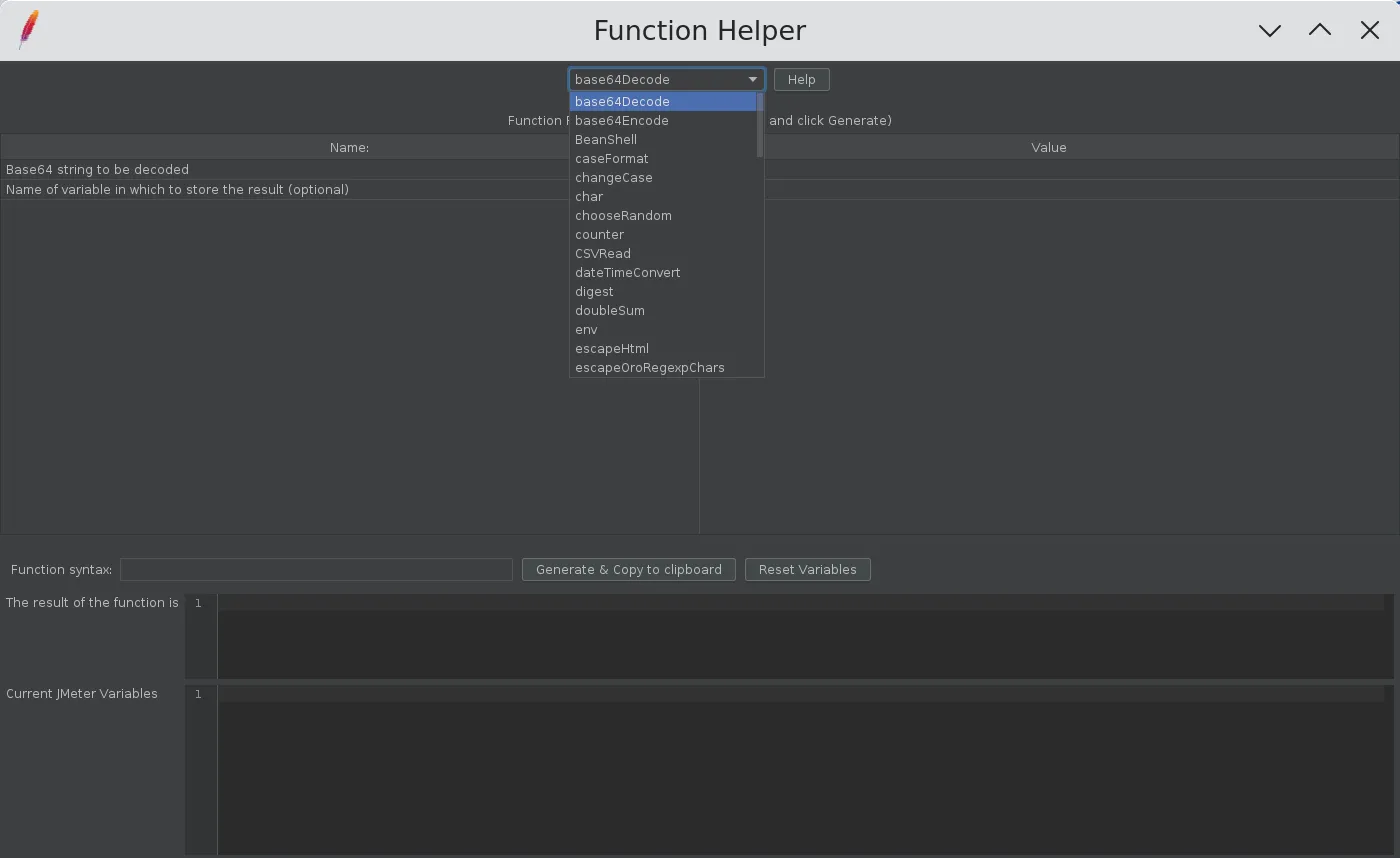
3. Use the Function Helper to get the syntax right
I always build a new function call in the Function Helper first. Pick the function, fill in the parameters, and click Generate. The helper shows the exact syntax, the result, and the JMeter variables after the call. Here I encoded the demo credentials loadtester:S3cret! and stored the result in authToken:
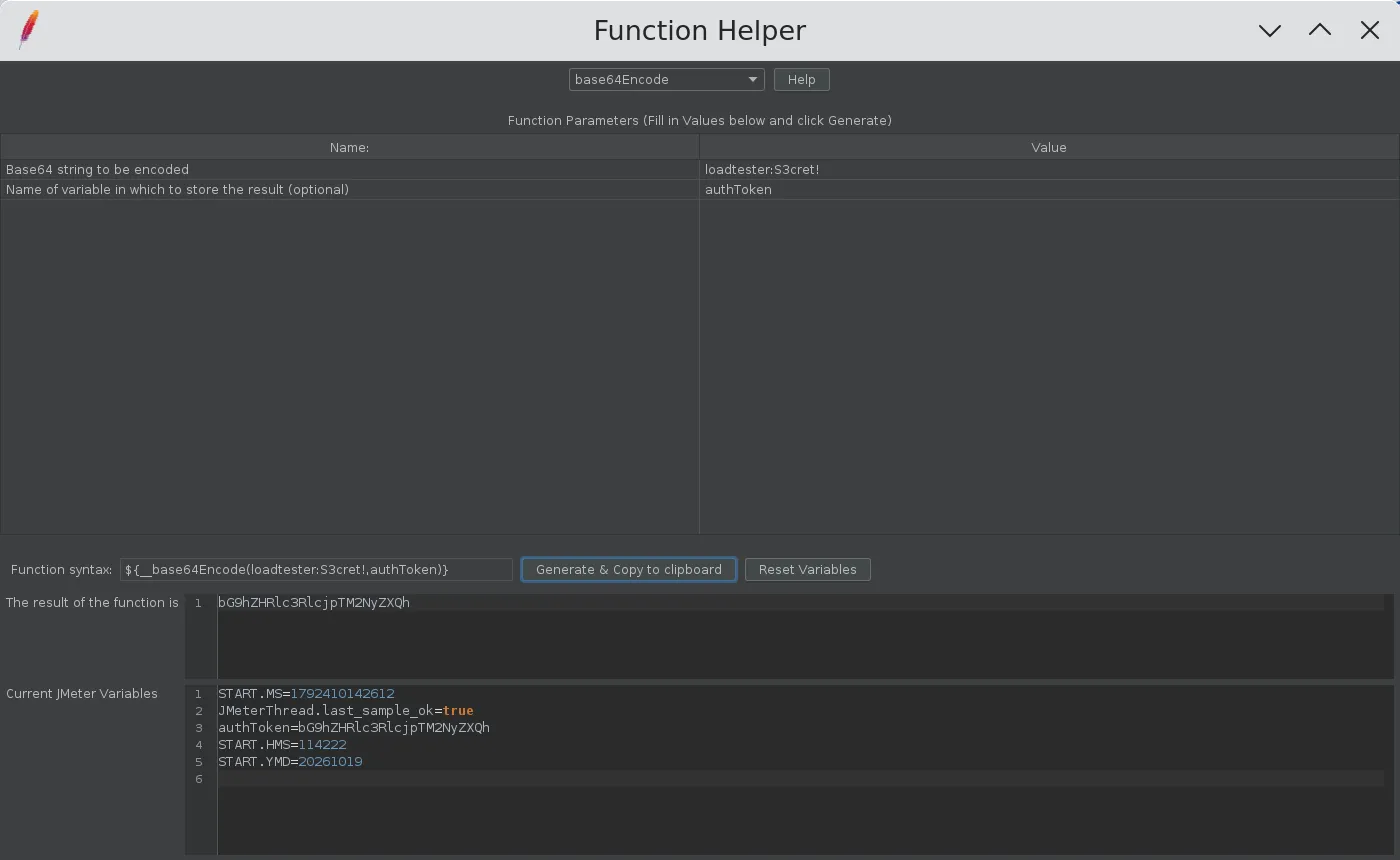
The “Current JMeter Variables” panel is the quickest way to confirm that the optional variable name argument works the way you expect, before you put the function in a 500-thread test.
4. A practical example: one request, nine custom functions
The demo test plan has a Thread Group with 2 threads, a 1 second ramp-up, and 3 loops, so 6 samples in total. It sends POST /orders to a local echo server on port 8099 that returns the headers and body it received.
The HTTP Header Manager builds a Basic auth header from two environment variables and a request ID from the thread number, iteration, and time:
Authorization Basic ${__base64Encode(${__env(API_USER,,perfuser)}:${__env(API_PASS,,changeme)})}X-Request-Id ${__MD5(${__threadNum}-${__iterationNum}-${__time()})}Content-Type application/jsonThe __env arguments are the environment variable name, an optional JMeter variable name (left empty here), and a default value. So the credentials never live in the JMX, and the test still runs on a laptop with perfuser:changeme when the variables are not set.
The request body uses the rest of the functions:
{ "env": "${__env(TARGET_ENV,targetEnv,staging)}", "iteration": ${__iterationNum}, "channel": "${__chooseRandom(web,mobile,partner-api,channel)}", "priority": "${__if(${channel},mobile,high,normal)}", "sku": "${__caseFormat(Blue Running Shoe,UPPER_UNDERSCORE,sku)}", "skuLength": ${__strLen(${sku})}, "total": ${__doubleSum(19.99,5.01,orderTotal)}, "couponDefined": ${__isDefined(coupon)}}Notice how values flow from one function to the next inside the same field. __chooseRandom stores its pick in channel, and __if reads ${channel} two lines later. __caseFormat stores sku, and __strLen measures it. JMeter evaluates the expressions from left to right, so this works as long as the producer appears before the consumer.
Here is how it looks inside the JMX, in case you want to paste it into your own plan:
<elementProp name="" elementType="Header"> <stringProp name="Header.name">X-Request-Id</stringProp> <stringProp name="Header.value">${__MD5(${__threadNum}-${__iterationNum}-${__time()})}</stringProp></elementProp>I ran it in non-GUI mode with the environment variables set:
export API_USER=loadtester API_PASS='S3cret!' TARGET_ENV=perf./bin/jmeter -n -t custom-functions-demo.jmx -l results.jtlsummary = 6 in 00:00:01 = 11.5/s Avg: 3 Min: 1 Max: 18 Err: 0 (0.00%)5. What JMeter actually sent
The View Results Tree shows the resolved values. For the second iteration of thread 1, the request body was:
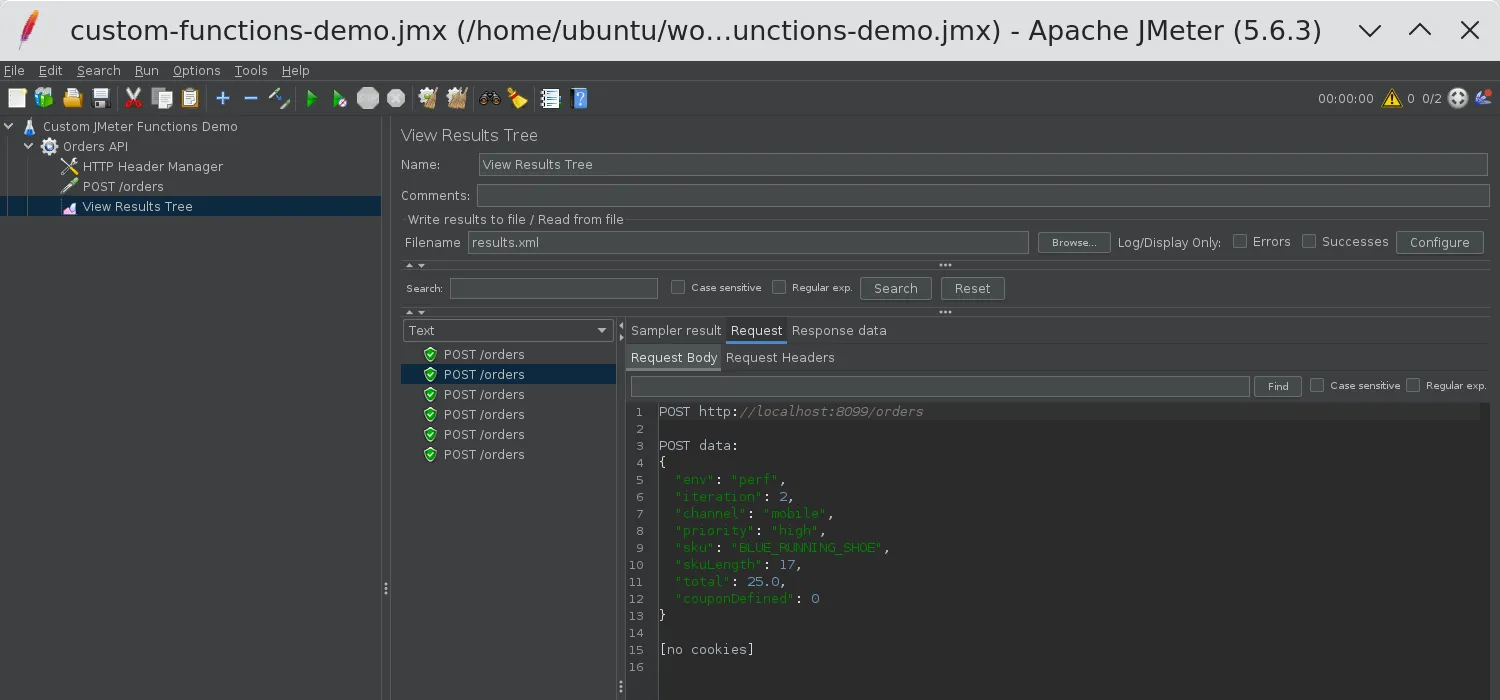
And the request headers:
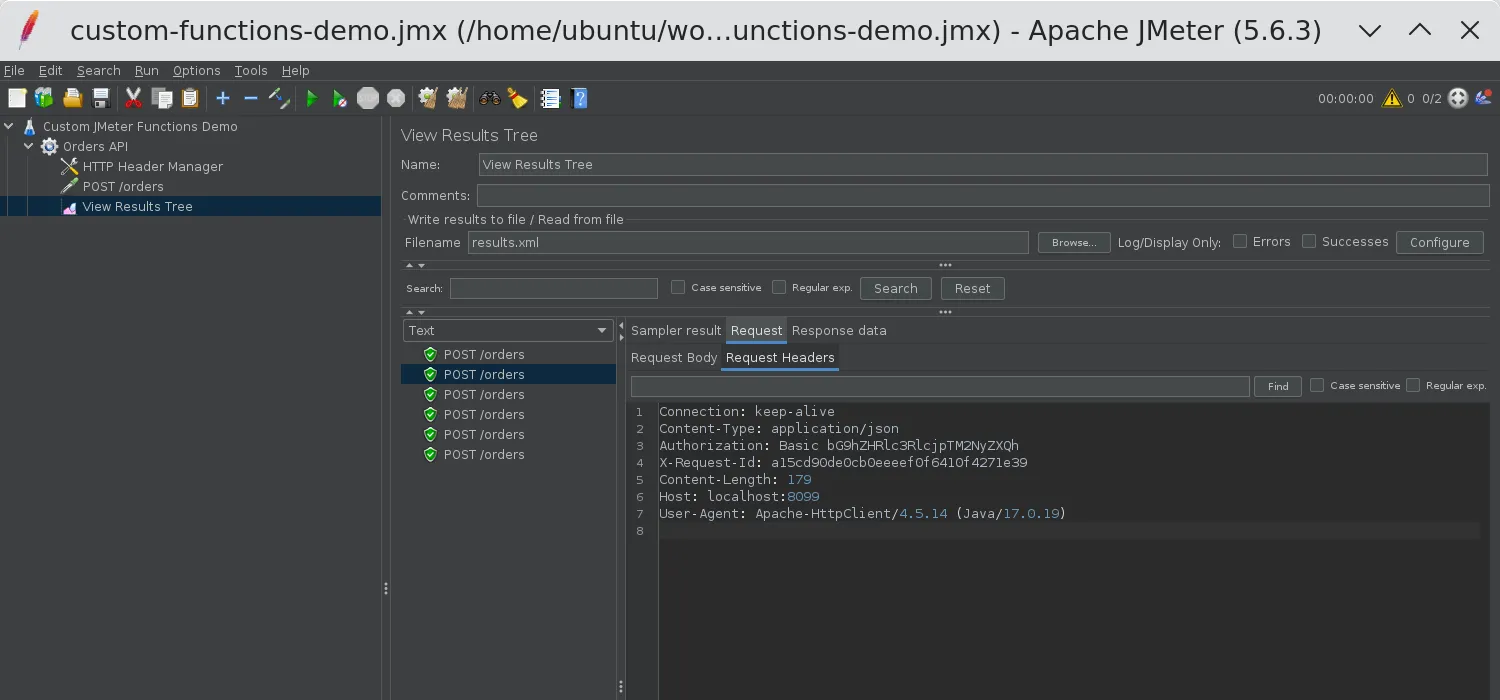
Let me map each value back to its function:
| Field / header | Expression | Resolved value |
|---|---|---|
env | __env(TARGET_ENV,targetEnv,staging) | perf (from the OS) |
iteration | __iterationNum | 2 |
channel | __chooseRandom(web,mobile,partner-api,...) | mobile |
priority | __if(${channel},mobile,high,normal) | high |
sku | __caseFormat(...,UPPER_UNDERSCORE,sku) | BLUE_RUNNING_SHOE |
skuLength | __strLen(${sku}) | 17 |
total | __doubleSum(19.99,5.01,orderTotal) | 25.0 |
couponDefined | __isDefined(coupon) | 0 |
Authorization | __base64Encode(...) | Basic bG9hZHRlc3RlcjpTM2NyZXQh |
X-Request-Id | __MD5(...) | a15cd90de0cb0eeeef0f6410f4271e39 |
Across the 6 samples, every request had a different X-Request-Id, and the priority field was high only on the samples where channel was mobile.
6. Function reference with argument order
The argument order is where most mistakes happen, so here is what I verified against the plugin source for version 2.2. Arguments in square brackets are optional.
| Function | Arguments |
|---|---|
__env | name, [varName], [default] |
__base64Encode | string, [varName] |
__base64Decode | string, [varName] |
__MD5 | string, [varName] |
__chooseRandom | value1, value2, …, varName (at least 3 arguments) |
__if | actual, expected, ifEqual, ifNotEqual, [varName] |
__doubleSum | number1, number2, …, [varName] |
__isDefined | varName |
__strLen | string, [varName] |
__substring | string, beginIndex, endIndex, [varName] |
__strReplace | string, search, replacement, [varName] |
__strReplaceRegex | string, regex, replacement, [varName] |
__caseFormat | string, [mode], [varName] |
For __caseFormat, the mode is case insensitive. The supported values include LOWER_CAMEL_CASE (the default when the mode is empty), UPPER_CAMEL_CASE, SNAKE_CASE, KEBAB_CASE, TRAIN_CASE, and UPPER_UNDERSCORE. The 2.2 release also fixed a usability issue in __strReplaceRegex, so make sure you are not on an older version if you rely on it.
7. Pitfalls I hit while building the demo
1. __chooseRandom always treats the last argument as a variable name. If you write ${__chooseRandom(web,mobile,partner-api)}, the plugin picks between web and mobile only, and stores the result in a variable called partner-api. Always add a variable name as the last argument, even if you do not need it.
2. __doubleSum decides if the last argument is a variable name by parsing it. If the last argument is a number, it is added to the sum and nothing is stored. If it is not a number, it is treated as the variable name. ${__doubleSum(1.5,2.5)} returns 4.0, while ${__doubleSum(1.5,2.5,total)} returns 4.0 and also sets total. Also note the output is a Java double, so 25 becomes 25.0. Make sure your API accepts that format.
3. __if compares strings, not numbers. The plugin uses a plain equals check, so 5 and 5.0 are different, and so are Mobile and mobile. Normalize the value first with __lowercase or __caseFormat if the source is inconsistent.
4. __env without a default returns the variable name. If TARGET_ENV is not set and you write ${__env(TARGET_ENV)}, you get the literal string TARGET_ENV in your request, not an empty value. I always pass a default. Also remember that in distributed mode, functions run on the load generators, so each remote server needs the environment variable, not only the controller. The distributed load testing plugins post has more on that setup.
5. Commas inside arguments must be escaped. JMeter splits function arguments on commas. To encode a,b with __base64Encode, write a\,b. This is standard JMeter function behavior, and the Function Helper escapes it for you if you type the value there.
6. __MD5 is for identifiers, not security. It is perfect for a unique, fixed-length request ID or a cache key that a server expects. If the API needs an HMAC or SHA-256 signature, use the built-in __digest function, which supports other algorithms and a salt.
8. Custom functions or built-in JMeter functions?
JMeter 4.0 and later added several built-in functions that overlap with this plugin. I still use the plugin in a few cases, mainly because the syntax is shorter and the optional variable name is consistent across all functions.
| Task | Custom JMeter Functions | Built-in alternative |
|---|---|---|
| Read an environment variable | __env | __groovy(System.getenv('NAME')) |
| Base64 encode | __base64Encode | __groovy with java.util.Base64 |
| MD5 or SHA hash | __MD5 | __digest(MD5,...), also SHA-256 and others |
| Random pick from a list | __chooseRandom | __RandomFromMultipleVars (needs variables) |
| Case conversion | __caseFormat | __changeCase (upper, lower, capitalize) |
| Check if a variable exists | __isDefined | __isVarDefined |
My rule of thumb: if the function is evaluated on every sample at high throughput, prefer a non-scripting function over __groovy. Both the plugin functions and the built-in ones like __digest are plain Java and avoid the script engine overhead. For quick mock data while you design the plan, pair these functions with the Dummy Sampler so you can check the output without a server.
Conclusion
The JMeter Custom Functions plugin gives you small, focused functions for the jobs that come up in almost every API test: reading environment variables, encoding credentials, generating request IDs, and shaping test data. Use the Function Helper to get the syntax right, always pass a default to __env and a variable name to __chooseRandom, and remember that __if compares plain strings. With those three habits, you can keep secrets out of your JMX and Groovy out of your hot path.
You can find download trends, versions, and the install ID on the Custom JMeter Functions page on PerfAtlas.
Happy Testing!