JMeter Random CSV Data Set Config: How to Read Test Data in Random Order

JMeter Random CSV Data Set Config: How to Read Test Data in Random Order
In this blog post, we will see how the JMeter Random CSV Data Set Config plugin reads test data in random order, and how to avoid accidentally sharing accounts between virtual users. I will use five synthetic users, verify the variables in the JMeter GUI, and then run the same plan from the command line. There is no application server involved, so we can separate data problems from API problems.
The plugin is BlazeMeter’s Random CSV Data Set, identified as bzm-random-csv in Plugins Manager. I tested version 0.8 with JMeter 5.6.3 and Java 17. Its useful distinction is not just randomness: you choose whether threads consume one shared list or each thread has its own list. That choice matters much more than whether Alice appears before Bob.
1. When to use JMeter Random CSV Data Set Config
Suppose your CSV contains 10,000 product IDs sorted by category. Reading sequentially can make the beginning of your test concentrate on one category, then move to another. A randomized traversal mixes the input order without requiring you to shuffle the file before every run.
This is also useful for searches, customer lookups, and read-only account activity. It is not a substitute for deciding your workload distribution. A file with 9,000 US accounts and 1,000 EU accounts still has that composition after randomization. Random order does not make those regions equally common.
I would keep the core CSV Data Set Config for straightforward sequential data feeding. I would add this plugin when randomized traversal is a requirement, rather than adding scripting just to pick random line numbers.
| Requirement | Starting point |
|---|---|
| Read rows sequentially with no extra plugin | Core CSV Data Set Config |
| Consume CSV rows in random order | Random CSV Data Set Config |
| Let threads draw from one randomized pool | Leave Independent list per thread unchecked |
| Give every thread a traversal of the entire file | Check Independent list per thread |
| Reuse data after reaching the end | Check Rewind on end of list |
The official README documents these options. Do not read its comparison with the core component as a promise that every core setting exists here. This GUI has its own controls; for example, it does not expose the core component’s Sharing mode dropdown.
2. Install the plugin and prepare five rows
In JMeter, open Options > Plugins Manager, find Random CSV Data Set, install it, and restart. If Plugins Manager is missing, follow the Plugins Manager installation guide first. Use the same plugin version on every load generator, not just the machine where you edit the plan.
For my local verification I installed jmeter-plugins-random-csv-data-set-0.8.jar in JMETER_HOME/lib/ext and its jmeter-plugins-cmn-jmeter-0.7.jar dependency in JMETER_HOME/lib, then started JMeter. Plugins Manager normally handles dependency installation for you.
Create a directory containing your saved test plan and this users.csv file:
userId,username,region101,alice,us102,bob,eu103,carol,apac104,david,us105,erin,euUse synthetic data, not production usernames or passwords. Keep the first trial tiny: five rows are enough to spot a header being treated as data, a delimiter mismatch, or a repeated account. You can inspect all five results before introducing thousands of users.
The README says relative filenames resolve against the active test plan. For distributed execution, it specifically requires the file on the server hosts in the appropriate relative location for the server process. Saving a file beside the controller’s JMX does not copy it to remote engines.
3. Configure the data element and preview it
Add a normal Thread Group with 1 thread, a 1-second ramp-up, and 5 loops. Under that thread group, add Config Element > bzm - Random CSV Data Set Config. Save the plan as random-csv.jmx beside users.csv.
Use these settings for the first run:
| Setting | Value | Reason |
|---|---|---|
| Filename | users.csv | File beside the saved test plan |
| File encoding | UTF-8 | Matches the input file |
| Delimiter | , | Splits these three columns |
| Variable names | userId,username,region | Explicit destination variables |
| Random order | Checked | Random traversal rather than file order |
| Rewind on end of list | Unchecked | Do not recycle rows |
| First line is CSV header | Checked | Skip the header with explicit variable names |
| Independent list per thread | Unchecked | One shared list |
Click Test CSV Reading. The preview should report five records and show variable mappings. It shows at most 20 records, so it is a parsing smoke test, not proof that a large file is completely valid.
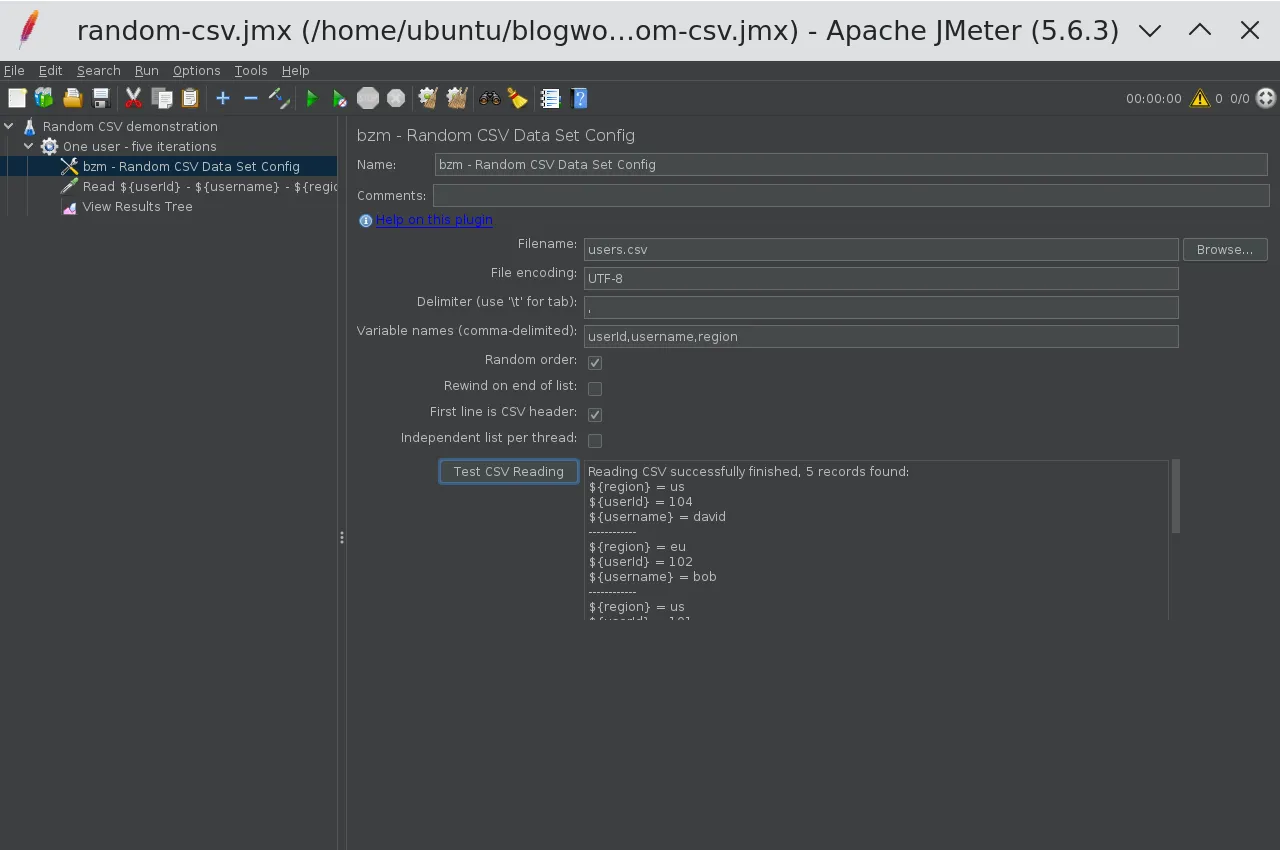
There are two valid header approaches. With explicit Variable names, the First line is CSV header checkbox tells the plugin to skip the file’s first row. With Variable names left empty, the plugin reads variable names from the header instead; the README says the checkbox is used only when Variable names is not empty. Do not leave an arbitrary data row at the top and expect JMeter to invent useful variable names.
The delimiter splits the file’s columns. The variable-name list remains comma-delimited even if the file itself uses another delimiter. For a semicolon-separated file, change Delimiter to ;, but keep the names as userId,username,region.
4. Verify the values without sending HTTP requests
Under the same Thread Group, add Sampler > Debug Sampler, and set JMeter variables to true. Leave JMeter properties and system properties disabled so the response is easy to inspect. Set the sampler’s name to:
Read ${userId} - ${username} - ${region}Add Listener > View Results Tree, then start the test. Select a result and open Response data. The body should contain matching values such as userId=103, username=carol, and region=apac. All three columns come from the same selected row; the plugin is not independently randomizing each column.
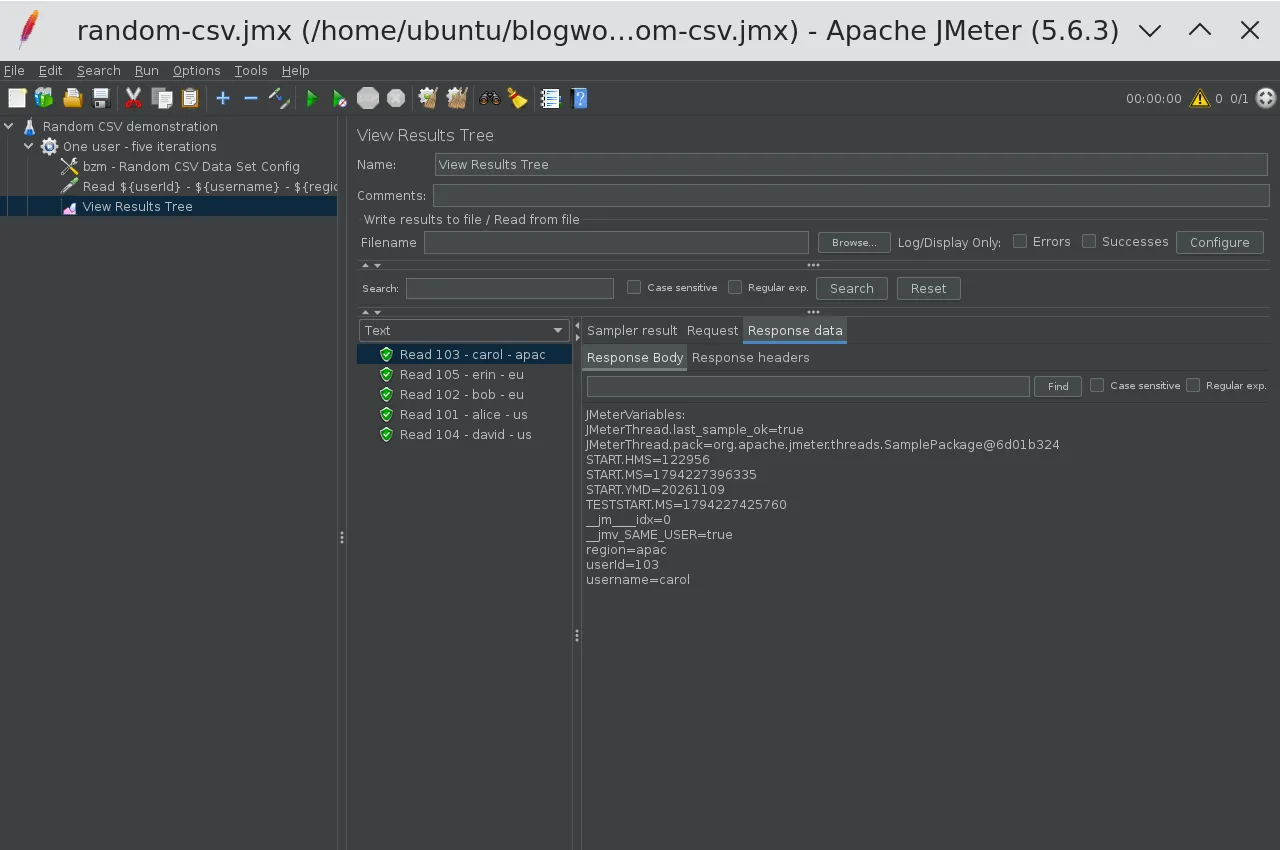
My GUI run produced IDs 103, 105, 102, 101, 104. That sequence differs from the command-line run below, which is expected. The important checks are five distinct IDs, matching fields, no header record, and no unresolved ${username} in the labels.
The configuration advances on iteration boundaries, not once per HTTP request. If you put three HTTP samplers in the same ordinary Thread Group iteration, you can use the selected account across those three requests. Do not calculate required CSV rows by counting total HTTP samples alone.
Once data feeding is correct, replace the Debug Sampler with your real requests and use variables in their paths, parameters, or bodies. If you also need a mock response to test extractors, the Dummy Sampler guide covers that next step. Remove debugging listeners from actual load runs.
5. Choose shared or independent lists deliberately
With Independent list per thread unchecked, threads consume a common list. With Random order enabled and rewind disabled, rows are consumed without replacement within that list. This is not the same as making a fresh random choice from all five rows on every iteration.
For example, two threads running two iterations each need four row assignments. With a shared five-row file and no rewind, that leaves one unused row. Which thread receives which row depends on execution order; do not assume thread 1 receives the first two entries in some predictable shuffle.
With Independent list per thread checked, each thread traverses its own list. Two threads can therefore both use account 101, even before either thread exhausts its list. That can be perfectly reasonable for read-only product searches. It can be wrong for login tests where a second session invalidates the first, or for workflows that spend a single-use coupon.
| Five-row file, two threads | Shared list | Independent lists |
|---|---|---|
| Available assignments before exhaustion, no rewind | 5 total | 5 per thread |
| Can different threads receive the same row before a full traversal? | Not from that shared traversal | Yes |
| Does this ensure uniqueness across remote engines? | No | No |
Each remote engine is a separate process with its own file and plugin state. If three engines all read the same 10,000 accounts, a local shared list does not create a global 30,000-account allocator. Partition the accounts into separate files if cross-engine uniqueness is required.
Also separate row uniqueness from business uniqueness. Two CSV rows containing the same username are still two different rows. A randomized traversal will not deduplicate them for you.
6. Understand rewind and end-of-file behavior
Rewind on end of list lets consumption continue after the list is exhausted. It is appropriate for reusable search terms, but repeated rows become possible after a traversal. Five rows cannot provide 500 unique account assignments, regardless of the random-order setting.
With rewind disabled, the plugin stops a thread when it attempts to read beyond the available records. The configuration source throws JMeterStopThreadException with the message All records in the CSV file have been passed. Do not expect a core CSV-style <EOF> value or an extra Stop thread checkbox in this plugin.
That distinction can explain an unexpectedly short test: your duration might allow ten minutes, but your non-rewinding data pool might only support the first minute of iterations. Check the JMeter log and size the file against data-consuming iterations, not just your planned duration.
For an empty file or a header-only file, I would fail data preparation before starting load. There are no usable rows to allocate. Do not rely on rewind to turn an empty data pool into valid input. Likewise, test missing files and incorrect paths in a small local run before distributing a plan.
7. Run the same plan from the command line
From the directory containing the saved JMX and CSV, I ran:
$JMETER_HOME/bin/jmeter -n -t random-csv.jmx -l results.jtl -j jmeter.logUse a new results filename for each verification run. My actual summary was:
summary = 5 in 00:00:00 = 64.9/s Avg: 0 Min: 0 Max: 1 Err: 0 (0.00%)The label column in that run’s JTL contained:
Read 103 - carol - apacRead 104 - david - usRead 102 - bob - euRead 105 - erin - euRead 101 - alice - usThose are real Debug Sampler results, not application response times. The summary’s request rate does not measure your API’s throughput. Here it only confirms the five data iterations completed without sampler errors, while the labels establish that the variables were populated correctly.
If you maintain JMX in source control, these are the plugin properties corresponding to the tested configuration. This is a config-element fragment, not a complete runnable test plan:
<com.blazemeter.jmeter.RandomCSVDataSetConfig guiclass="com.blazemeter.jmeter.RandomCSVDataSetConfigGui" testclass="com.blazemeter.jmeter.RandomCSVDataSetConfig" testname="bzm - Random CSV Data Set Config"> <stringProp name="filename">users.csv</stringProp> <stringProp name="fileEncoding">UTF-8</stringProp> <stringProp name="delimiter">,</stringProp> <stringProp name="variableNames">userId,username,region</stringProp> <boolProp name="randomOrder">true</boolProp> <boolProp name="rewindOnTheEndOfList">false</boolProp> <boolProp name="ignoreFirstLine">true</boolProp> <boolProp name="independentListPerThread">false</boolProp></com.blazemeter.jmeter.RandomCSVDataSetConfig>8. Check startup cost before scaling the data file
The README warns about startup delay and memory consumption with large files. The CSV reader source scans the file and builds row offsets. Random access is not a reason to assume negligible startup work or unlimited file size.
I would first verify five rows, then test the intended file size on one load generator while watching startup time and heap usage. Only then would I replicate the setup across engines. A successful preview of 20 records says nothing about whether your generator has enough memory for the full dataset under load.
9. Conclusion
Use Random CSV Data Set Config when you need randomized traversal of a CSV, not just because a test uses data. Start with a shared list and rewind disabled when rows must not repeat within one engine’s traversal. Choose independent lists only when cross-thread reuse is acceptable. My main takeaway: verify the row allocation rules with five synthetic records before letting thousands of virtual users consume the file.